WorkFolderAI · Force Multiplier for EspoCRM

One person, the output of a team.

The force multiplier for EspoCRM: an assistant that knows how your organisation works. Drop a procedure and get a work plan, drop a spreadsheet and get a report, ask how something is done and get your own answer.
US$399per site, one-off, every edition.
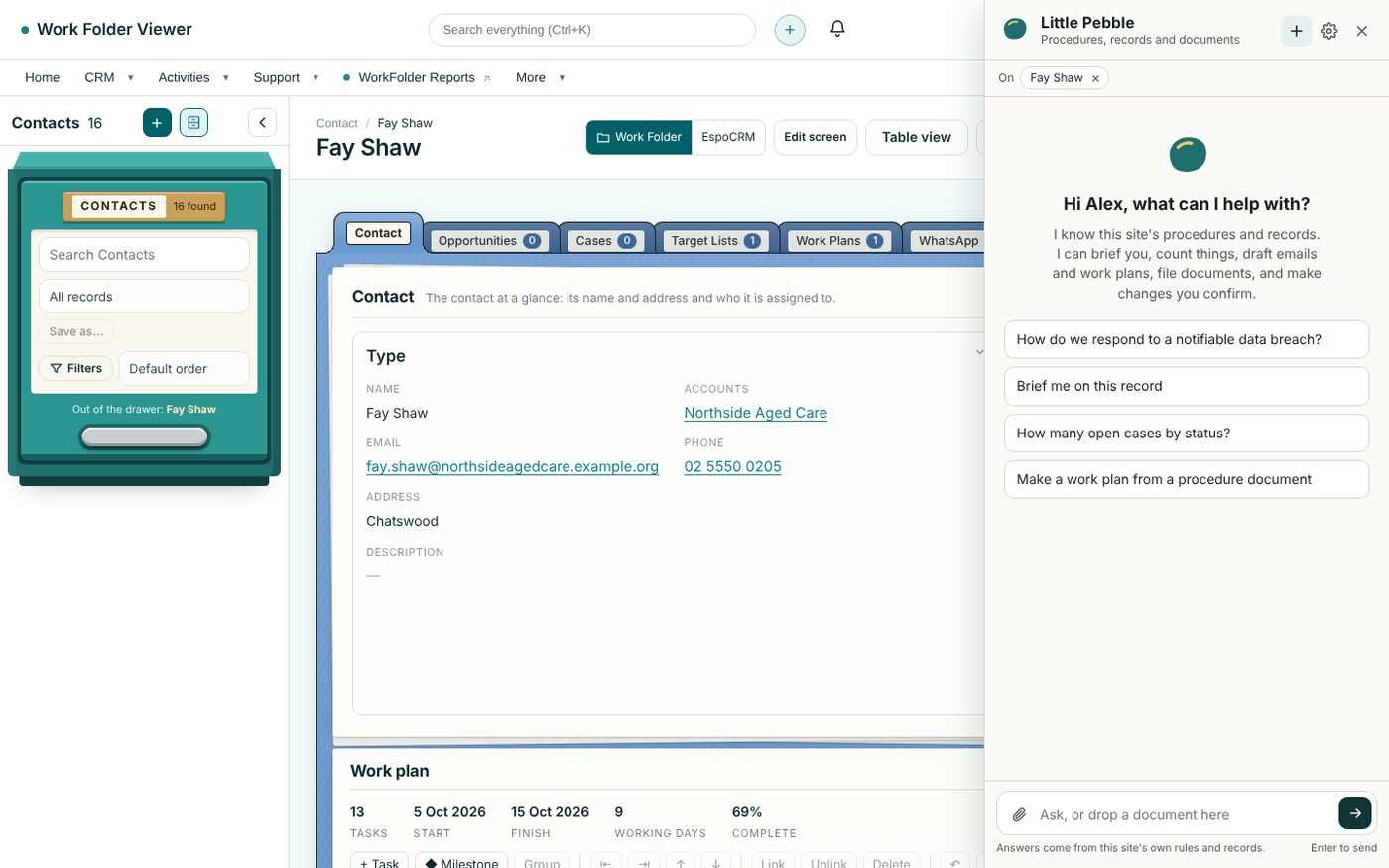
LITTLE PEBBLE
WorkFolderAI open beside a Work Folder, on the record you are on
Why it is different

Most AI add-ons summarise a record. WorkFolderAI builds the work.

Record summaries and email drafts are table stakes. WorkFolderAI turns your documents into working structure inside EspoCRM and answers from the rules your site actually runs.

1

Built into EspoCRM, not bolted on

It works with your records, roles, reports, work plans and knowledge base directly. Nothing is copied to another system.

2

A document becomes working structure

Drop a procedure, spreadsheet, letter or form: get a work plan, a report, an email template or a filed record. Hours become minutes.

3

A helpdesk for your own apps

How-to answers come from the processes, workflows, articles and plan templates your site actually runs, so staff learn your way of doing things.

4

Nothing changes until you confirm

Every change is a card first, with 10-minute undo. Emails are saved as drafts and never sent.

5

Each person sees only what they may see

The assistant works with the user's own access rights. Portal and API users are refused.

6

Your key, your data, your costs

It runs on your own AI account. The key stays on the server, the minimum data is sent, and usage is tracked with limits you set.

7

It keeps your procedures honest

The health check finds rules with no write-up, write-ups of switched-off rules and stale articles, then drafts the missing article.

8

Made for Plus

Work Planner, Reports and the Work Folder give it things to build. On a Plus site it does what no record-level AI can.

See it work

Ask in your own words

Pictures from the live demo, with made-up sample data.

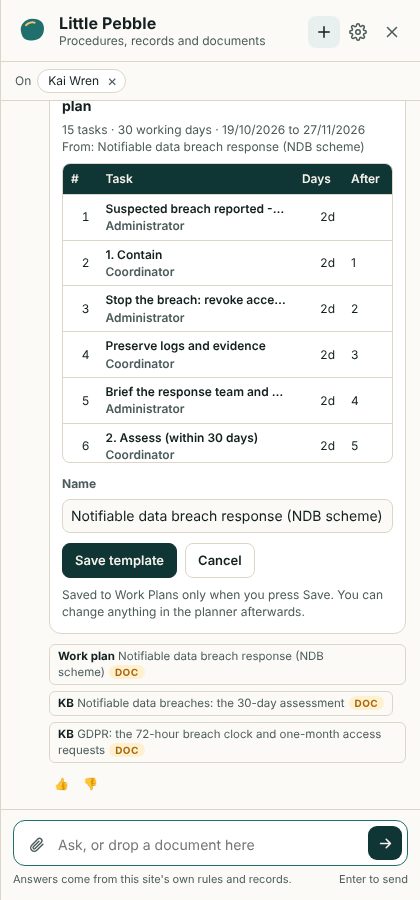
A procedure becomes a work plan

Make a work plan template from the notifiable data breach procedure

The assistant reads the procedure and lays out the tasks, durations, order and who does each. Check it, save it, and the whole team can start plans from it.
A procedure becomes a work plan
An informed helpdesk for your apps

Your procedures, answered by your own system.

Every night WorkFolderAI reads your BPM processes, workflows, knowledge base, documents and Work Plans templates and writes each one up in plain words. Staff ask how something is done and get your answer, marked Rule when the system enforces it and Doc when it is only written down. When the two disagree, it says so.
  1. Administrators review the Process Map and mark entries right, add notes or hide them.
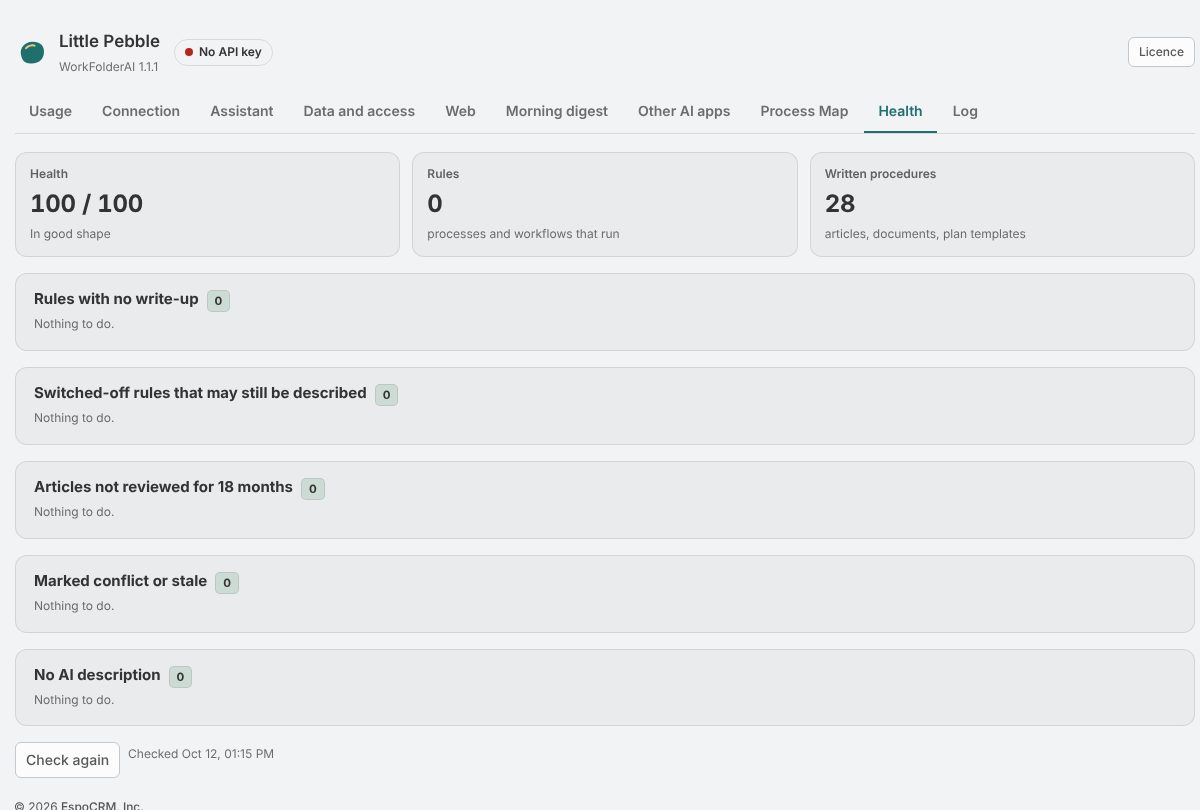
  2. The health check scores your procedures and lists rules with no write-up and articles nobody has reviewed.
  3. For a rule with no write-up, it drafts the article. A person checks and publishes it.
The procedure health check
Everything it does

Six jobs it takes off your hands

Drop to create

  • Work plans and templates from procedure documents
  • Start a plan from a template by asking
  • Reports from a spreadsheet (WorkFolder Reports)
  • Email templates from a letter or notice
  • Files filed against the right record; application forms create the person

Your helpdesk

  • How-to answers from your own processes, workflows, articles and plan templates
  • A nightly Process Map of what your rules really do, reviewed by administrators
  • Procedure health check with a score
  • Drafted knowledge base articles for rules with no write-up
  • Optional web search with sources shown

Summaries and insight

  • Brief me on any record
  • Counts, totals and averages with a chart, by asking
  • Save the chart as a report
  • Morning digest: overdue tasks, today's meetings, plan tasks, dates to watch

Emails and conversations

  • Draft emails to people and records (never sent)
  • Summarise an email or WhatsApp conversation (opt-in)
  • Suggest a reply (opt-in)
  • Suggest who should handle it (opt-in)

Getting work done

  • Open any record or Work Folder by asking
  • Change records with confirm and 10-minute undo
  • Update many records at once, within a limit you set
  • Use it from Claude, ChatGPT and other AI apps, with a confirm link

Control, privacy and cost

  • Your own Anthropic key, never in the browser
  • Minimum data; notes and messages only by opt-in; sensitive fields blocked
  • Every answer and change uses the person's own roles
  • Usage and cost by person and day, with a monthly limit
  • A 12-month log for administrators, with feedback on every answer
Price

US$399 per site, one-off

12 months of updates and support, renew at 40% (US$160 a year). One flat price for every site and every edition; partners get their 40% partner price on client sites. The AI runs on your organisation's own Anthropic account and is billed by Anthropic by use; the Usage page shows the cost and a monthly limit can pause it.

Works with
  • EspoCRM 9.0 or later, self-hosted
  • Inside EspoCRM and the Work Folder, desktop and phone
  • WorkFolder Work Plans for plans and templates (included with Plus)
  • WorkFolder Reports for saved reports
  • WorkFolder Messenger for WhatsApp for conversation help

See your own EspoCRM with a new face.

Try it free for 30 days on your own EspoCRM. Nothing to install: sign in and see your records as work folders.